


Projectivy Launcher
4.6236.00 Reviews
App Specs
- Version
- 4.71
- Updated On
- License
- Free
- Downloads
- 1,000,000+
- Developer
- Spocky
- Categories
- Personalization
- Platform
- Android
Screenshots
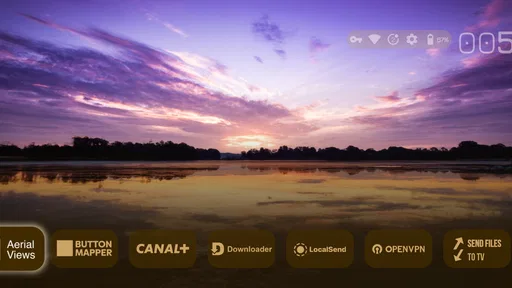
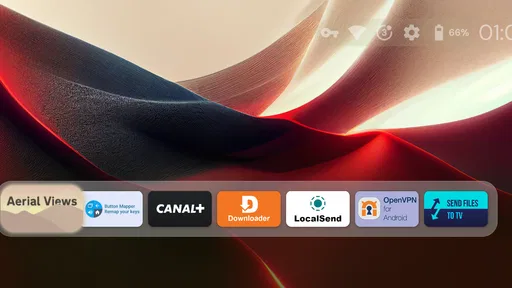
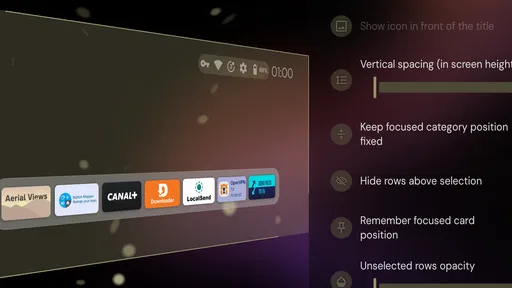
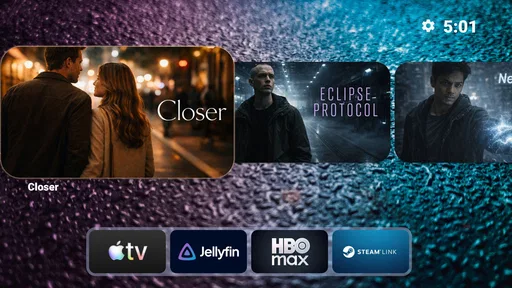
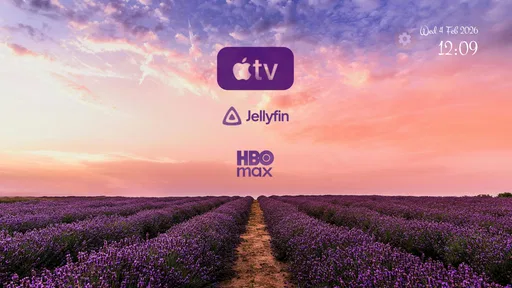
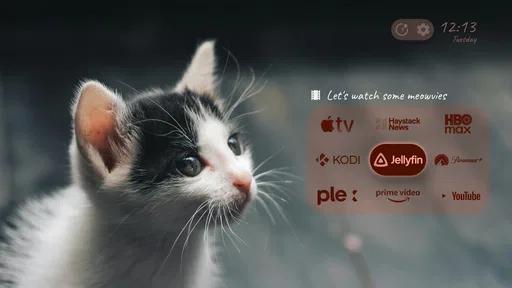
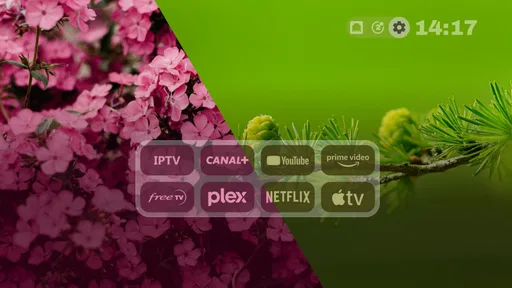
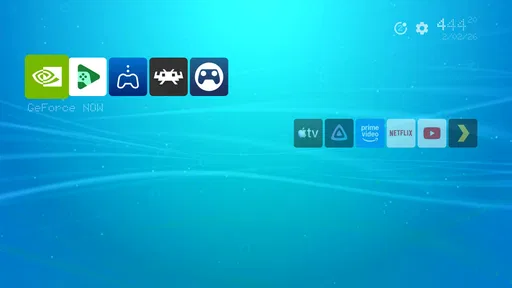
 Analysis by AppCompare
I first noticed Projectivy Launcher because it makes an Android TV home screen feel like something I can shape around my habits, rather than a fixed row of recommendations. That difference is most exciting in the first few days: moving things around, choosing what deserves space, and seeing the television become easier to navigate. The more important test, though, is whether those choices remain useful once the novelty of changing the screen wears off.
The first week: a home screen that feels more yours
My first impression is that this is a personalization app for people who want more say over their Android TV layout than the standard launcher usually gives them. It is made by Spocky, and the appeal is practical as much as visual: a television is often used from across the room, so a layout that puts familiar choices where I expect them can save small bits of effort every day.
The early setup is also where the app asks for patience. A launcher changes the main doorway into the device, so the first round of adjustments can feel more consequential than changing a wallpaper. I would start with the basics—what should be easy to reach, what can be tucked away, and how much information I want to see—then live with that arrangement before attempting a full redesign.
What makes it useful after the novelty fades
Once the layout is settled, the question is not whether I can keep customizing it, but whether I still benefit from the result. For a household that returns to the same few apps, a carefully arranged screen can become a quiet convenience: less browsing, fewer repeated searches, and a clearer route to the things people actually use. That recurring value is more convincing than a theme that looks exciting for one evening.
The fit is less obvious for someone who is happy with the TV’s default screen and rarely changes it. A different launcher is worth keeping only if the arrangement solves a real annoyance or feels easier to use. I would not install one just to have more settings to manage; customization is useful when it reduces friction, not when it becomes another hobby I have to maintain.
Maintenance, trade-offs, and who should skip it
Any personalized home screen creates a small maintenance choice. If viewing habits change, the layout may need a refresh; if they do not, leaving it alone is the better move. I prefer a restrained setup that can survive a change in routine over a screen packed with shortcuts that looked clever during setup but are hard to scan later.
I would recommend giving it a try if you use Android TV regularly and find the default experience cluttered or poorly organized. I would skip it if you want the television to stay exactly as it came, or if adjusting a launcher sounds more tiring than helpful. People who share a TV should also think about whether a personalized arrangement will make navigation clearer for everyone or only for the person who configured it.
Worth Reading Before You Choose

EA SPORTS FC Mobile 26 Is a Bigger Football Game, but It Takes Time

Flipboard Shows What News Apps Must Do Beyond the Feed

Switching to Android Auto Means Rethinking Your Driving Routine

Google Calendar Makes a Crowded Week Easier to Manage

Ludo King Makes the Most of the Minutes Between Plans

Baby Panda World Brings Quick Play to Modern Phones, but Its Game Library Feels Busy
Unpacking the Features
First off, what really caught my attention was how flexible this launcher is. The Projectivy Launcher offers a slew of customizable options that can make your device look like it just rolled out of a sci-fi movie. Whether you’re into minimalistic designs or love a vibrant, widget-packed home screen, this launcher has got you covered.
One of the standout features is the ability to adjust the grid layout to insane levels of precision. Want five icons in a row instead of four? Done. Need a little more space between your widgets? Easy peasy. It's all about giving you control over how every single element aligns on your screen.
Widgets and More Widgets
Widgets are the unsung heroes of any good launcher, and here they shine brightly. With a variety of options to choose from, you can keep your most-used apps and info right at your fingertips. Plus, there's a unique feature that allows you to create custom widgets from scratch. It's like having a mini-design studio in your pocket!
And let's not forget the app drawer. It's sleek, intuitive, and sports a search function that’s faster than a caffeine-fueled squirrel. You can even hide apps you rarely use, keeping everything neat and tidy.
Performance and Usability
Now, onto performance. I've had my fair share of launchers that promise the world but end up slowing my phone down to a snail's pace. Not this one, though. Projectivy Launcher is optimized to keep everything running smoothly. It's so light on resources that even my aging device feels like it's been injected with new life.
The user interface is intuitive, which means there’s no steep learning curve. Even if you're not a tech whiz, you’ll find yourself navigating through its features like a pro in no time. Plus, the handy tutorials included in the app are a nice touch for first-timers.
Personalization Galore
What really makes Projectivy Launcher stand out is the level of personalization it offers. You can choose from a plethora of icon packs to give your phone a unique look. The themes are diverse, ranging from sleek and modern to retro and playful. And the best part? You can mix and match to create something truly unique.
Oh, and did I mention the gesture controls? Swiping up, down, or sideways can open apps, toggle settings, and more. It's like having a magic wand for your smartphone.
A routine that puts the layout to work
Here is the sort of everyday use that makes a customized launcher earn its place: I switch on the TV after dinner, want to resume the same viewing app, and do not want to hunt through a busy home screen while everyone waits. I would put the regular destination where it is immediately visible, keep occasional apps out of the way, and avoid filling the screen with options the household rarely chooses. The benefit is not a dramatic new capability; it is a familiar route that takes less thought.
That workflow also suggests a useful setup tip: make one change at a time. First adjust the arrangement, then use it for a few evenings before adding more visual elements. If a widget or shortcut does not answer a question you regularly have, it is probably taking up attention without earning its space. A sparse screen can be more legible from a sofa than a clever but crowded one.
How it compares with the usual choice
Compared with sticking to the launcher already on the television, Projectivy is for people who value control over leaving the interface untouched. The default option is usually the simpler choice when its organization already makes sense or when several people prefer not to learn a different layout. A custom launcher is more appealing when the standard screen repeatedly sends you searching for the same apps or presents more visual material than you want.
It is also worth separating visual customization from day-to-day improvement. A new arrangement can look cleaner without making the remote-control experience better. I would judge the result by whether the intended app is easier to reach and whether other viewers can still understand the screen—not by how many adjustments are available. If those practical gains are absent, returning to the familiar default is a reasonable decision.
Cost, compatibility, and settling in
The app is free to install, with optional in-app purchases priced from under a dollar to several dollars per item. Its age rating is Everyone, and it requires Android 6.0 or later. The current version is 4.68. Those details make it straightforward to assess basic eligibility, but they do not change the main decision: the app is most worthwhile when you want to reorganize an Android TV experience, not simply collect customization options.
It has an average rating of 4.5 from around 2.3 thousand ratings, with 199 written reviews and over a million installs. I treat that as useful context rather than a guarantee that every television setup will feel identical. If you are unsure whether a redesigned screen will suit your household, begin with a modest layout and see how it feels in ordinary use before investing time in fine adjustments or optional purchases.
Where the friction can show up
The main trade-off is that more control can mean more decisions. A grid that is easy to tune invites experimentation, but the ability to keep adjusting things does not automatically improve navigation. There is also a shared-device consideration: the person who builds the screen may understand its shortcuts immediately, while another viewer may prefer obvious labels and familiar placement. I would prioritize clarity over cleverness if the TV is used by guests or family members with different habits.
Another sensible limit is to avoid treating every available customization as a required step. Start with the layout, then decide whether widgets, visual changes, or gestures solve a particular problem for you. Gestures can be convenient once they become familiar, but they are less discoverable than visible controls. If someone else uses the device, keeping important routes apparent may matter more than making the screen as minimal as possible.
Is It Worth a Download?
Absolutely! If you're on the hunt for a launcher that’s big on customization and low on resource consumption, look no further. The Projectivy Launcher offers a seamless blend of style and functionality that makes it a joy to use. It's perfect for those who love to tweak every last detail of their device's appearance and functionality.
In conclusion, while no app is perfect, this one comes pretty close for anyone who cherishes a personalized mobile experience. So, why not give it a shot? You might just find your new favorite launcher. Happy customizing!
My long-term verdict
For lasting value, I would keep this launcher only if the revised home screen becomes a better everyday starting point than the default one. The strongest case is not endless tweaking; it is settling on a clear arrangement that makes repeated viewing routines easier. If you enjoy configuring your Android TV and can keep the result understandable for everyone who uses it, the app has a convincing reason to stay installed.
If the setup turns into ongoing maintenance, or the standard launcher already gets you where you want to go, there is little reason to force the change. I would approach it as a practical experiment: make a few deliberate adjustments, live with them, and keep only what saves effort. That is the difference between a brief customization kick and a home screen that continues to feel useful.
Pros
- Highly customizable interface options.
- Efficient performance and speed.
- Minimalistic design enhances focus.
- Organizes apps into intuitive categories.
- Regular updates with new features.
Cons
- Limited free version features.
- Occasional minor bugs reported.
- Steeper learning curve for new users.
- Customization can be time-consuming.
- Requires Android 8.0 or higher.
FAQs for Projectivy Launcher
What is Projectivy Launcher and how does it enhance my phone's usability?
Projectivy Launcher is a customizable home screen replacement app for Android devices. It enhances your phone's usability by offering unique features such as widget support, custom gestures, and a sleek interface. It aims to streamline your phone's navigation, making access to apps and information quicker and more intuitive.
Is Projectivy Launcher compatible with all Android devices?
Projectivy Launcher is designed to work with a wide range of Android devices. However, for optimal performance, it's recommended to use it on devices running Android 5.0 (Lollipop) or higher. Compatibility may vary slightly depending on specific device models and custom Android skins.
Does Projectivy Launcher offer any customization options?
Yes, Projectivy Launcher offers extensive customization options. Users can personalize their home screen layout, icon styles, themes, and apply custom gestures. This level of customization allows users to create a tailored experience that suits their individual preferences and enhances their interaction with their device.
Is Projectivy Launcher a free app, or does it require payment?
Projectivy Launcher is available as a free download with basic features. However, it may offer in-app purchases or a premium version that unlocks additional features, such as advanced customization options and exclusive themes. Users can choose whether to invest in these extras based on their needs.
How does Projectivy Launcher impact my phone's performance and battery life?
Projectivy Launcher is designed to be lightweight and efficient, minimizing impact on your device's performance and battery life. While any launcher may use some resources, Projectivy focuses on optimizing processes to ensure smooth functionality. Users typically report a negligible effect on overall system performance.


